Minute-by-minute checklist
- Try calling the phone.
- Locate it with Find My / Find My Device from another phone or computer.
- Play sound if it might be nearby.
- Mark as lost / secure lock with a message and callback number.
- Change important passwords if you think it was stolen.
- Erase only when recovery is unlikely and backups are confirmed.
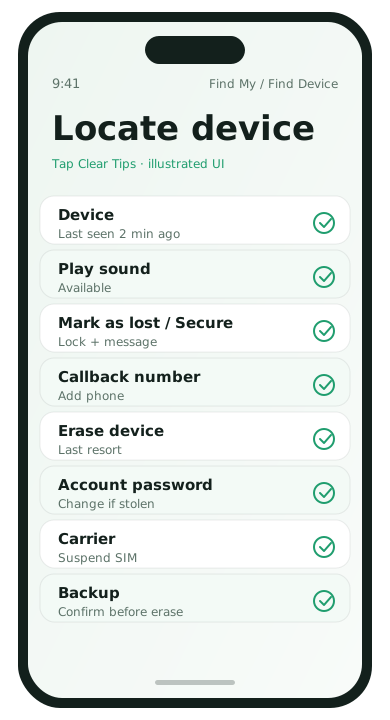
iPhone: Find My
- From another Apple device or iCloud.com, open Find My.
- Select the missing iPhone.
- Use Play Sound, then Mark As Lost.
- Add a contact phone number on the lock message.
- Erase as a last resort; Activation Lock continues to protect Apple ID devices.
Android: Find My Device
- Visit android.com/find and sign in with the phone’s Google account.
- Select the device.
- Secure device / lock with a message.
- Erase if necessary after backup confidence.
Also do these account steps
- Sign out of banking sessions / call your bank if theft is likely
- Change Apple ID / Google password and review recent security activity
- Ask your carrier to suspend service to block calls/SMS abuse
Prevention before the next scare
- Confirm Find My / Find My Device is on today
- Keep backups current
- Use a strong lock screen
If the map shows a location
- Nearby at home/work: play sound and search systematically
- Moving on a street: do not confront strangers alone; contact local authorities if theft is clear
- At a restaurant/rideshare: call the business or use the ride history chat with a lock-screen message visible
If the phone is offline
Keep Find My / Find My Device open and wait for a momentary signal. Leave Lost Mode / secure lock on so the phone locks if it reconnects. Meanwhile change Apple ID / Google passwords and alert your carrier.
After recovery
- Confirm you can unlock normally.
- Review account sign-ins for unfamiliar sessions.
- Update the OS.
- Decide whether a reset is warranted if the phone was out of sight for a long time.
Prepare this week so panic mode is easier later
- Confirm Find My / Find My Device is on
- Memorize which Google or Apple ID the phone uses
- Keep a current backup
- Add a lock-screen medical/ICE contact if you want a callback path for strangers
Also write your carrier’s support number in a notebook or password manager that is not only on the missing phone.
Shared family devices
If a child or partner’s phone is missing, use Family Sharing / family map features only as configured and permitted. Do not publicly post live locations of a minor. Coordinate privately and involve local authorities when theft or safety risk is involved.
Lost phone FAQ
- Should I erase immediately?
- Not if there is a good chance of recovery and the phone is locked. Use Lost Mode first.
- What if Find My was off?
- Locate options shrink. Call the carrier, change passwords, and still attempt android.com/find or iCloud in case of partial data.
- Can I track after erase?
- Apple Activation Lock and Google account protections still discourage resale, but live tracking stops after erase.
- What about SIMs?
- Ask the carrier to suspend service quickly to block SMS-code theft.