Take a screenshot
Face ID models: press Side button + Volume Up together.
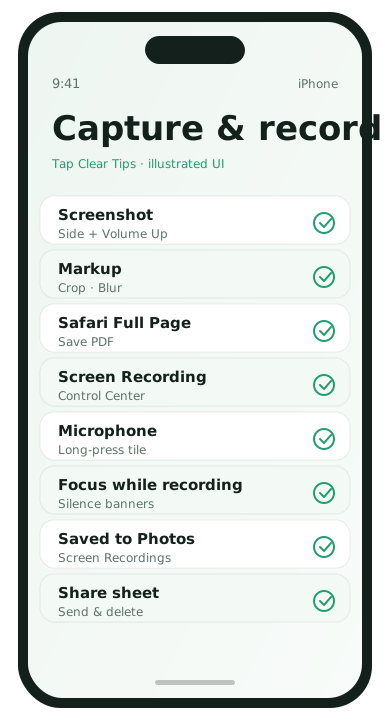
Home button models: press Side/Top + Home together.
- Capture the screen.
- Tap the thumbnail to crop, markup, or share.
- Swipe the thumbnail away to save quickly.
Full-page screenshot in Safari
- Take a screenshot on a web page in Safari.
- Tap the thumbnail.
- Choose Full Page.
- Save as PDF to Files if offered.
Turn on Screen Recording
- Settings → Control Center.
- Add Screen Recording.
- Open Control Center and tap the record icon.
- Long-press the icon to enable microphone audio if needed.
- Stop from the red status bar or Control Center.
Editing before you send
- Use markup to highlight the important area
- Crop out notification banners
- Delete recordings you no longer need from Photos
Privacy reminders
Screen recordings capture everything visible, including incoming notification banners. Enable Do Not Disturb before recording a tutorial when possible.
Markup for clearer communication
After tapping the screenshot thumbnail, use the Markup pencil to highlight the exact setting someone should tap. The loupe and text tools help when you are helping a family member remotely. Save to Photos only when you need a record; otherwise share and delete to keep storage tidy.
Full Page captures beyond quick shares
Safari Full Page saves are useful for receipts, confirmation pages, and long reference docs. Save the PDF to Files in a folder like Travel or Taxes. That keeps Screenshots in Photos from becoming a junk drawer.
Screen Recording audio choices
- Microphone off: best for silent how-to clips of settings menus
- Microphone on: narrate while you tap, useful for family tech help
Remember that microphone recording can pick up nearby conversations. Record in a quiet room when narration matters.
Sharing screenshots safely
- Crop notification banners before sending
- Blur message contents that include addresses or tracking numbers if the recipient does not need them
- Avoid screenshotting authentication QR codes meant only for you
If you help relatives often, keep a Focus mode named Recording that silences lock-screen previews while you capture tutorials.
Finding recordings later
Screen recordings appear in Photos, often in a Screen Recordings album. Rename important clips in Files if you need a durable archive outside the camera roll.
iPhone capture FAQ
- How do I pause a recording?
- Stop it from the red status bar, then trim in Photos.
- Can I screenshot without buttons?
- Back Tap accessibility can trigger screenshots if configured.
- Why is Full Page missing?
- It appears for Safari web pages more reliably than in arbitrary apps.
- Do recordings include notifications?
- Yes, unless you silence them first with Focus.