Normal warm vs too hot
- Normal: warm during games, 4K video, or hotspot use
- Problem: hot while idle, repeated heat warnings, apps crashing from temperature
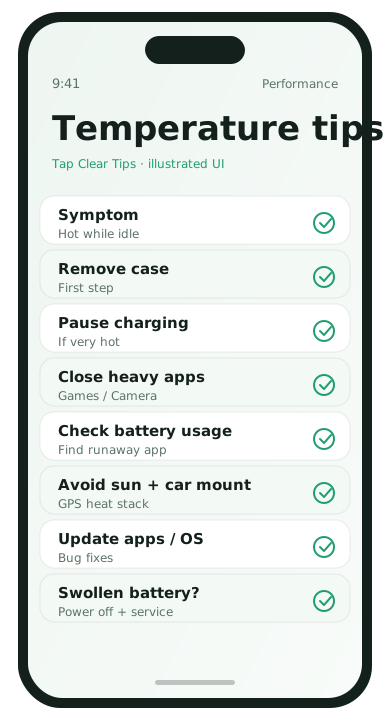
Immediate cooling steps
- Take the phone out of a thick case.
- Stop charging for a few minutes if it is very hot.
- Leave a cool room surface—not a freezer.
- Close heavy games and camera sessions.
Software checks
- Update the system and the apps that were open when heat started
- Check battery usage for a runaway background app
- Disable unnecessary Always location access
- Reduce refresh-heavy widgets temporarily
Charging habits that reduce heat
- Use a quality cable and charger suited to your phone
- Avoid gaming while fast charging under a pillow or blanket
- Remove MagSafe/thick wallets if the phone is roasting during charge
When to seek repair
If the phone heats while idle after a reboot, with no demanding apps, stop troubleshooting loops and contact the manufacturer or a trusted shop—especially if the device is swollen, which needs immediate power-off and service.
Common heat triggers people underestimate
- Wireless charging pads with poor alignment
- Car dash mounts in direct sun
- Camera recording in 4K for long stretches
- Multiple apps using GPS at once (maps + fitness + weather widgets)
- Old cases that trap heat during fast charge
48-hour diagnosis
- Note when heat happens: charging, gaming, navigation, idle.
- If idle heat persists, reboot and do not install anything new for a day.
- Check battery usage for a top background app.
- Uninstall or restrict that app and retest.
- Update OS and the suspect app before assuming hardware failure.
Write a one-line note on what changed. Heat problems are easier to solve with a tiny log than with memory alone.
Car and summer scenarios
Phones on car mounts face sun + GPS + charging at once. Shade the device, lower screen brightness, download offline maps before the drive, and use a cooler vent mount when possible. If the phone warns about temperature, pause charging and navigation until it cools.
Overheating FAQ
- Is warm gaming normal?
- Yes. Hot + warning + idle heat is not.
- Can wallpaper cause heat?
- Live wallpapers and heavy widgets add some load; they are rarely the only cause.
- Does dark mode fix heat?
- It can help on some OLED screens but will not fix a runaway app.
- Should I put the phone in the fridge?
- No. Move it to shade and room temperature air.